AGAMA Car Launcher
altercars.ruAuto & Vehicles
4.51.01K Reviews
- Version
- 5.0.5
- Installs
- 5.00M
- Age Rating
- Everyone
Screenshots
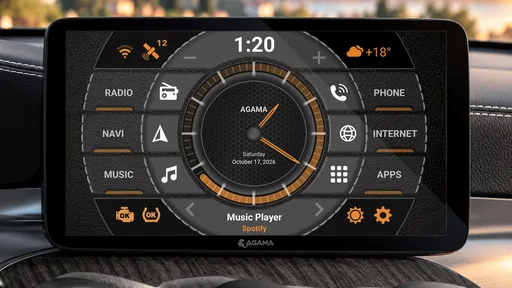
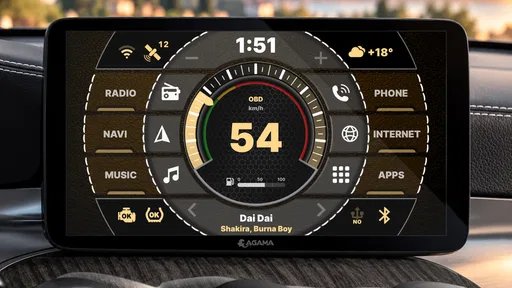
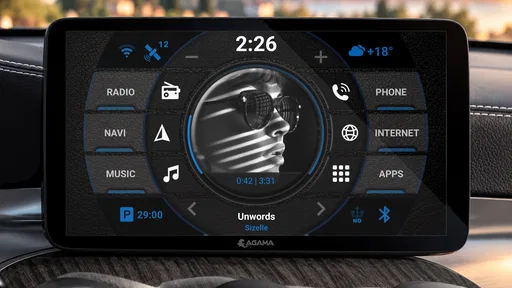
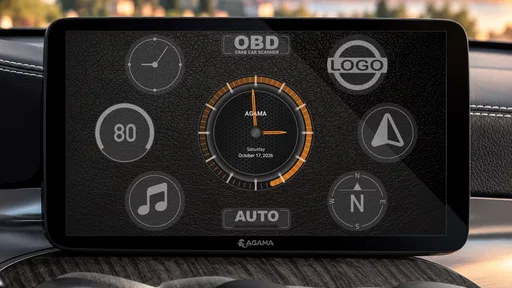
Our Review of AGAMA Car Launcher
 Analysis by Appyee
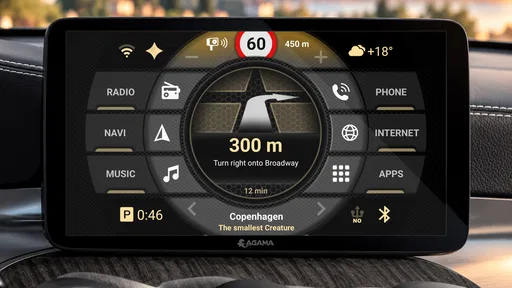
I think AGAMA Car Launcher makes the most sense when you want an Android car screen to feel more like a focused driving dashboard than a regular phone home screen. Its appeal is not that it replaces every tool you use in the car; it gives your chosen apps and information a more deliberate place. That distinction matters: if your current setup already feels clear and comfortable, there may be little reason to change it. If you regularly hunt through icons before a trip, though, a launcher built around the car can be a useful improvement.
What changes when the car screen is the starting point
A launcher shapes what you see first and how you reach the things you use most. In a car, that is more than a cosmetic choice. A screen designed around a small set of driving tasks can make it easier to open navigation or audio without scanning a crowded collection of phone apps. I would treat the home screen as a place for the essentials, not as another space to fill with every shortcut available.
That approach also gives you a practical way to judge whether this app suits your setup: consider how often you use the car display, which apps you reach for, and whether the existing interface makes those actions awkward. AGAMA is most compelling when it helps solve a specific bit of friction. It is less compelling if you expect a new launcher to improve the underlying capabilities of your head unit or make every connected app behave differently.
A sensible way to use the trial
The app is free to download and offers a 30-day trial, so I would use that period as a proper test rather than spending the first session endlessly adjusting colors. Start by setting up a simple home screen for the journeys you actually make. Then try it in the stationary car, check that the important controls are easy to reach, and make small changes only when a real inconvenience appears.
That order is useful because customization can become its own distraction. A layout that looks great while parked may be harder to understand in changing light or when you are in a hurry. I would settle on a few familiar positions for the apps you use most and leave the rest alone. If the screen is not clearer after a week of ordinary driving, the trial has still answered the important question: a different launcher may not be what your setup needs.
Check the fit before relying on it
AGAMA is an Android home-screen app for car multimedia systems, rather than a standalone navigation or music service. That means your experience depends in part on the Android device and the apps you already use. Before making it your regular starting screen, check that the car unit runs Android and that the apps you rely on are available and behave as expected on it. A familiar launcher cannot fix a slow unit, a weak connection, or an app that is awkward to use on that screen.
For a daily commute, the advantage can be modest but real: start the car, open the dashboard, and reach your usual navigation and audio choices from one organized place. For a longer drive, a stable layout can save you from repeatedly searching through a general-purpose home screen when you stop and restart the car. I would still make route changes while parked. A large icon is not permission to interact with a display while driving.
Who will get the most from it
This is a better fit for drivers who already have an Android multimedia unit and want to arrange its home screen around driving. It may also suit someone who enjoys tailoring the look of a device and is willing to spend a little time deciding which shortcuts deserve space. If you prefer the default interface, use a different kind of car system, or want an app that supplies navigation and entertainment by itself, this is probably not the right purchase or download to start with.
Compared with leaving the standard Android launcher untouched, AGAMA offers a more car-specific way to organize the screen. Compared with a dedicated phone-mirroring interface, it is a different kind of solution: it changes the home screen on the Android multimedia system rather than serving as a general substitute for that system’s other features. Which is better depends on your hardware and habits. If you mostly use phone projection and rarely interact with the unit’s own home screen, a launcher may add little.
There is also a sensible safety trade-off. More visible shortcuts can reduce searching, but extra widgets and decorative options can make the display busier if you add too much. I would favor a restrained layout, with only the controls I need during a trip, and do the customization while parked. The aim should be fewer glances and less rummaging, not a dashboard that invites you to explore it on the move.
Hey there, fellow road warriors! I’ve recently been diving into the world of customizable car interfaces, and I stumbled across something pretty neat. It’s called AGAMA Car Launcher. If you’re like me and you love having everything organized and at your fingertips while on the go, this app might just be your new best friend. Let’s hit the road and see what it’s all about!
First Impressions
When I first opened AGAMA Car Launcher, I was greeted by a sleek and modern interface. It’s got this cool minimalist vibe going on, which makes everything feel super intuitive. The app is designed to replace your car’s boring old dashboard with something way more functional and customizable. And trust me, it’s a game-changer for tech-savvy drivers like us.
Customization Galore
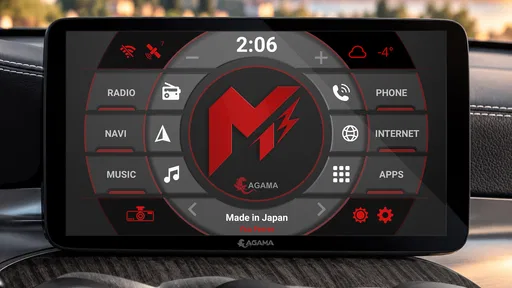
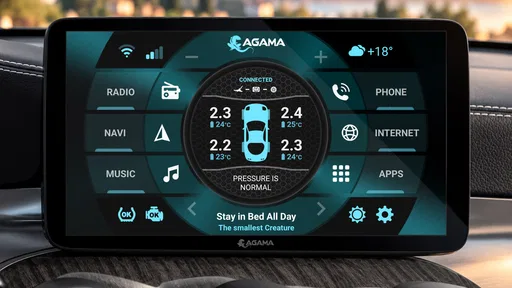
One of the standout features is how customizable it is. You can tweak just about everything to make it your own. Want a different color scheme? No problem. Fancy adding your own widgets? Easy peasy. It’s like turning your car into a personal command center. I spent a good chunk of time just playing around with different layouts and themes. It’s really fun to see how much you can personalize it.
The app supports multiple skins and themes, so whether you’re into a classic look or something more futuristic, there’s something for everyone. And the best part? It’s super easy to switch things up whenever you feel like it. Just a few taps, and boom, you’ve got a fresh new look.
Functionality at Its Best
Now, let’s talk about functionality. This isn’t just a pretty face; it packs a punch in terms of features. You can integrate your favorite music apps, navigation tools, and even your phone’s contact list. It’s all about making your drive as smooth and enjoyable as possible.
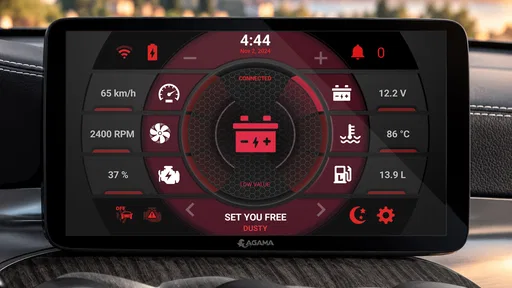
One feature I really appreciate is the speedometer widget. It’s nice having that digital readout right there, especially if your car’s built-in speedometer is a little hard to read at a glance. Plus, you can keep an eye on things like fuel level and battery life if you’re driving an EV.
Easy on the Eyes
Driving can be stressful enough without having to squint at tiny icons or confusing layouts. That’s why I love the big, bold icons in AGAMA. Everything is designed to be driver-friendly, which means you can keep your eyes on the road and not on your screen. Safety first, right?
The app also offers a night mode, which automatically kicks in when it gets dark. It’s a nice touch that reduces glare and makes everything easier to see when you’re driving at night. Honestly, it’s these little details that really make a difference.
Getting Started
Setting up the app is a breeze. Even if you’re not the most tech-savvy person, you’ll find the process straightforward. Once you download it, you’ll be guided through the setup, and before you know it, you’re ready to roll. The app works smoothly on both Android and iOS, so whatever device you’re using, you’re covered.
And speaking of devices, the app supports Bluetooth connectivity, so you can easily integrate it with your car’s existing system. It’s nice not having to fiddle with wires or deal with compatibility issues.
What to expect from the free version
The app is free, with in-app purchases listed at $8.49 per item, and the 30-day trial is worth treating as a decision period rather than assuming every option will remain available without charge. I would check which features matter to me during normal use, then decide whether continuing makes sense before the trial ends. That is a more useful test than judging it only by how much time I can spend changing the appearance.
There is some friction in that arrangement: a trial means you need to keep track of when it ends, and the purchase model can make the final cost less obvious than a simple one-time price. If you only want a different visual style for a short while, that may not justify paying. If the home-screen organization becomes part of how you use the car every day, the value is easier to weigh against the cost.
Limits worth keeping in mind
A launcher is a layer over the Android system, not a way to turn an unsuitable display into a better one. Screen size, touch response, the car unit’s speed, and the apps installed on it all affect how pleasant the result feels. I would not choose AGAMA to compensate for hardware that already responds poorly, and I would not assume that a customized dashboard automatically brings every phone function onto the car screen.
It also asks you to make choices. The freedom to rearrange a home screen is valuable, but someone who wants a completely hands-off setup may find the initial tweaking unnecessary. Once you have found a layout that works, resist changing it just for novelty; consistency is more useful when you are reaching for controls on familiar routes. A clean, stable arrangement is a better outcome than a constantly redesigned one.
Trust, maturity, and compatibility
AGAMA is developed by altercars.ru and has been available since July 27, 2017. Its current version is 5.0.2, and it requires Android 5.0 or later. That gives a prospective user a straightforward compatibility check: look at the operating system on the multimedia unit itself, not just the phone you carry. The app is rated for Everyone, and its audience is broad, though the practical question is still whether your car’s Android screen supports the way you want to use it.
It has a 4.5 average from around 46,000 ratings, with more than 5 million installs. Those figures suggest that many Android users have tried it, but they should not replace a test on your own head unit. Car multimedia hardware varies, and a launcher that feels responsive on one screen may not feel as comfortable on another. I would use the trial to judge that firsthand instead of relying on popularity alone.
Final Thoughts
So, is AGAMA Car Launcher worth checking out? Absolutely. It’s the perfect blend of style and substance, offering a customizable and functional interface that can truly enhance your driving experience. Whether you’re a daily commuter or a road trip enthusiast, having everything you need right there on your dashboard is a game-changer.
In a world where technology is constantly evolving, it’s nice to have an app that keeps things simple yet sophisticated. So, if you’re looking to upgrade your car’s dashboard, give AGAMA Car Launcher a spin. You might just find it’s exactly what you’ve been searching for. Safe travels!
My recommendation is to try it if your car runs Android, you want a more orderly home screen, and you are comfortable spending a little time making that screen suit your habits. I would skip it if you expect a new navigation system, if your display is not Android-based, or if phone projection already gives you everything you need. Its strongest case is practical rather than flashy: a familiar arrangement of driving-related apps, presented in a style you can adjust.
In the end, I see AGAMA as a useful customization choice, not an essential upgrade for every driver. Keep the layout simple, test it on your own hardware, and judge it by whether it makes routine access clearer without tempting you to fiddle while moving. If it does, the trial gives you room to decide whether that improvement is worth keeping. If it does not, returning to the standard launcher is a perfectly sensible choice.
Verdict
Strengths of AGAMA Car Launcher
- Highly customizable interface
- Smooth and intuitive navigation
- Supports multiple widgets
- Compatible with most car models
- Offline maps and navigation
Limitations of AGAMA Car Launcher
- Limited free features
- Occasional lag on older devices
- Some widgets require premium
- No built-in music streaming
- Setup can be time-consuming
Similar Picks in This Category
View All
Android Auto
Google LLC4.1

maxim — order a taxi & food
PT. SITO4.7

Штрафы ГИБДД: проверка с фото
Pays LLC – Штрафы ГИБДД4.7

Номерограм – проверка авто
Авто Ассист4.8

Дром Авто
Дром4.9

Frequently Asked Questions
What is AGAMA Car Launcher and how does it enhance my driving experience?
AGAMA Car Launcher is a customizable dashboard app designed to optimize your in-car entertainment and functionality. It provides a user-friendly interface with easy access to navigation, music, and other essential apps while driving. With large icons and voice command support, it enhances safety and convenience, making your driving experience more enjoyable and efficient.
Is AGAMA Car Launcher compatible with all Android devices?
AGAMA Car Launcher is compatible with most Android devices running Android 5.0 and above. However, compatibility may vary depending on the specific model of your device and the version of Android it is running. It's advisable to check the app requirements on the Google Play Store to ensure it will function seamlessly on your device.
Can I customize the interface in AGAMA Car Launcher?
Yes, AGAMA Car Launcher offers extensive customization options. Users can choose from various themes, color schemes, and widgets to personalize their dashboard. You can also rearrange app icons and shortcuts to suit your preferences, ensuring that the most frequently used features are easily accessible, enhancing both functionality and aesthetics.
Does AGAMA Car Launcher support offline navigation?
AGAMA Car Launcher itself does not provide offline navigation; however, it integrates with popular navigation apps like Google Maps and Waze. These apps may offer offline navigation features, so it’s important to ensure that your chosen navigation app supports offline functionality if that’s a requirement for your use.
Is there a cost associated with using AGAMA Car Launcher?
AGAMA Car Launcher is available as both a free and a paid version. The free version includes essential features, while the paid version offers advanced customization and additional functionalities. Users can choose to upgrade to the paid version for a one-time fee to unlock the full potential of the app and enjoy an ad-free experience.
